Aigo Atlantis ATX Mid-Tower Desktop Computer Gaming Case Tempered Glass Windows With 3pcs 120mm LED…
For desktop PCs and gaming laptops, these are some of the best thermal pastes in 2026:
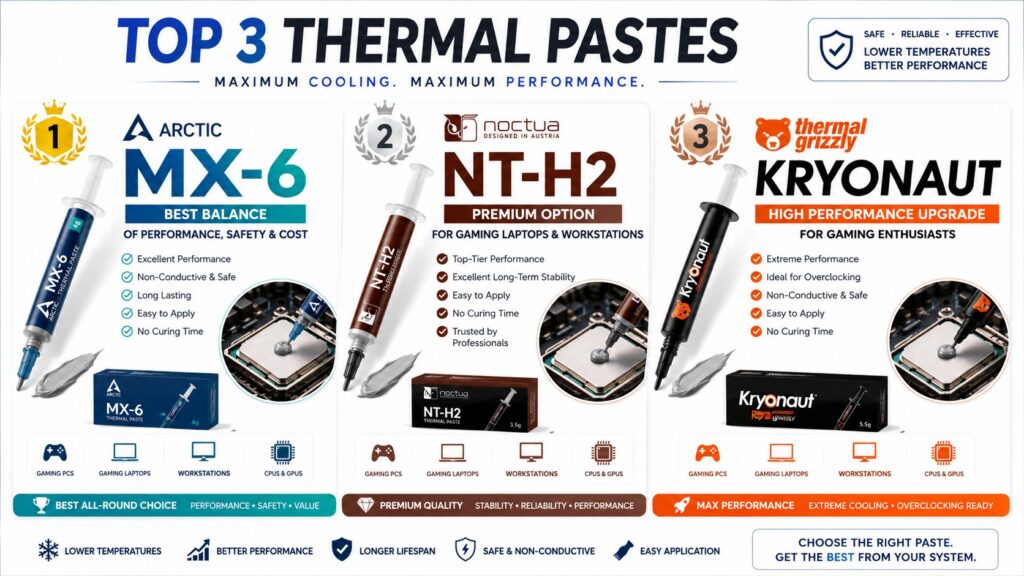
For desktop PCs and gaming laptops, these are some of the best thermal pastes in 2026:
Top Recommendations
Thermal Grizzly Kryonaut
- Excellent cooling performance
- Ideal for gaming PCs and high-end CPUs
- Easy to apply
- One of the most popular choices for enthusiasts
Arctic MX-6
- Great performance and value
- Non-conductive and safe
- Long lifespan
- Recommended for most users
Noctua NT-H2
- Reliable and easy to use
- Excellent long-term stability
- Perfect for CPU and GPU repasting
Corsair XTM70
- Very good thermal performance
- Easy application kit included
- Suitable for gaming systems
Best for Your Shop (Angkor Tech)
If you’re servicing customer PCs and laptops daily:
🥇 Arctic MX-6 — Best balance of performance, safety, and cost.
🥈 Noctua NT-H2 — Premium option for gaming laptops and workstations.
🥉 Thermal Grizzly Kryonaut — Offer as a “High Performance Upgrade” for gaming customers.
For Gaming Laptop Service
- ASUS ROG
- MSI Gaming
- Lenovo Legion
- Acer Predator
Use:
- Arctic MX-6 (standard premium service)
- Thermal Grizzly Kryonaut (high-performance service)
Avoid
- Very cheap unbranded thermal paste
- Conductive liquid metal unless you have experience (risk of short circuits)
For your Laptop Deep Clean Service ($25) at Angkor Tech, Arctic MX-6 is probably the best overall choice because it gives excellent results while remaining safe and reliable.


1-Arctic MX-6
Why it’s recommended:
- Thermal conductivity improved over MX-4
- Non-conductive (safe for laptops and desktops)
- No curing time required
- Long-lasting performance
- Easy to apply
- Suitable for CPUs, GPUs, gaming laptops, and workstations
Typical Usage
| Size | Approximate Applications |
|---|---|
| 2g | 1–2 laptops or PCs |
| 4g | 3–5 systems |
| 8g | 8–12 systems |
✅ Gaming laptops (ROG, MSI, Legion, Predator)
✅ Office laptops
✅ Desktop CPUs (Intel & AMD)
✅ GPU repasting
Application Method
- Clean old paste with isopropyl alcohol (90%+).
- Apply a small pea-sized dot in the center of the CPU.
- Reinstall the heatsink evenly.
- Check temperatures after installation.
Expected temperature improvement:
- 3–10°C lower than old or dried-out thermal paste.
- Often much more if the original paste is several years old.
For a repair shop like Angkor Tech, the Arctic MX-6 8g version is usually the most cost-effective size to keep in stock.
2-Noctua NT-H2


Key Features
✅ Premium-grade thermal paste from Noctua
✅ Non-conductive (electrically safe)
✅ No curing or burn-in time required
✅ Excellent long-term stability
✅ Easy to spread and apply
✅ Suitable for CPUs, GPUs, gaming laptops, and workstations
Performance
- One of the top-performing thermal pastes on the market.
- Typically performs within 1–2°C of the best enthusiast compounds.
- Often outperforms older pastes such as NT-H1 and many generic brands.
- Maintains performance for years without drying out quickly.
Recommended Uses
🎮 Gaming PCs
💻 Gaming Laptops (ASUS ROG, MSI, Legion, Predator)
🖥️ Workstations
🎨 Content Creation PCs
🔧 Laptop & Desktop Maintenance Services
Available Sizes
| Size | Usage |
|---|---|
| 3.5g | 3–5 applications |
| 10g | 10–15 applications |
NT-H2 vs MX-6
| Feature | Noctua NT-H2 | Arctic MX-6 |
|---|---|---|
| Cooling Performance | ⭐⭐⭐⭐⭐ | ⭐⭐⭐⭐⭐ |
| Ease of Application | ⭐⭐⭐⭐⭐ | ⭐⭐⭐⭐ |
| Longevity | ⭐⭐⭐⭐⭐ | ⭐⭐⭐⭐⭐ |
| Value for Money | ⭐⭐⭐⭐ | ⭐⭐⭐⭐⭐ |
| Laptop Service Use | ⭐⭐⭐⭐⭐ | ⭐⭐⭐⭐⭐ |
If you’re repasting customer laptops daily:
🥇 Arctic MX-6 → Best value and cost-effective for service work.
🥇 Noctua NT-H2 → Premium option for high-end gaming laptops and workstation customers.
Typical temperature improvement after replacing old paste:
- Laptop: 5–15°C lower
- Desktop CPU: 3–10°C lower
- Older gaming laptops can sometimes drop 15–20°C after cleaning and repasting.
Rating: ⭐⭐⭐⭐⭐ (9.5/10)
One of the safest and most reliable thermal pastes for professional computer repair shops.
3-Thermal Grizzly Kryonaut


Overview
Thermal Grizzly Kryonaut is one of the most popular enthusiast-grade thermal pastes for high-performance CPUs and gaming laptops. It is designed for maximum heat transfer and is widely used by gamers, overclockers, and PC builders.
Key Features
✅ Exceptional thermal performance
✅ Non-conductive (electrically safe)
✅ No curing time required
✅ Optimized for high-performance CPUs and GPUs
✅ Easy application with smooth consistency
✅ Made in Germany
Specifications
- Thermal Conductivity: 12.5 W/mK
- Operating Temperature: -250°C to +350°C
- Electrical Conductivity: Non-conductive
- Color: Gray
Recommended For
🎮 Gaming PCs
💻 Gaming Laptops (ROG, MSI, Legion, Predator)
🖥️ High-End Workstations
⚡ Overclocked Intel & AMD CPUs
🎨 Rendering & AI Workstations
Available Sizes
| Size | Typical Usage |
|---|---|
| 1g | 1–2 CPUs |
| 5.5g | 5–8 systems |
| 11.1g | 10–15 systems |
| 37g | Repair shops & bulk use |
Performance Comparison
| Thermal Paste | Performance |
|---|---|
| Thermal Grizzly Kryonaut | ⭐⭐⭐⭐⭐ |
| Noctua NT-H2 | ⭐⭐⭐⭐⭐ |
| Arctic MX-6 | ⭐⭐⭐⭐⭐ |
| Arctic MX-4 | ⭐⭐⭐⭐ |
| Generic Thermal Paste | ⭐⭐ |
Pros
✔ Excellent cooling performance
✔ Trusted by enthusiasts worldwide
✔ Ideal for gaming laptops with high temperatures
✔ Easy to clean and reapply
✔ Supports extreme cooling setups
Cons
✖ More expensive than MX-6 and NT-H2
✖ Can dry out faster than MX-6 in very high-temperature laptops over long periods
For Angkor Tech Service
Recommended Service Tiers:
🥉 Standard Service → Arctic MX-6
🥈 Premium Service → Noctua NT-H2
🥇 Gaming/Enthusiast Service → Thermal Grizzly Kryonaut
Expected Temperature Improvement
- Gaming Laptop: 5–15°C lower
- High-end Gaming Laptop after deep cleaning: 10–20°C lower
- Desktop CPU: 3–10°C lower
Rating
⭐⭐⭐⭐⭐ 9.8/10
If your customers have ASUS ROG, MSI Raider, MSI Katana, Lenovo Legion, Acer Predator, or high-end Intel Core Ultra / Ryzen 9 systems, Kryonaut is one of the best premium thermal pastes you can offer.
Share and like: